
 Photo unavailable. View product details.
HTP M12 Panel Mount Connector, Female, 4 Pole, PG 9, Back Mount
Consider for: Back-mount 4-pole where you solder your own wires (IP67)
See current price
Availability on product page
View Details|
M12 Panel Mount Connector Comparison: Front vs Back Panel, PCB vs Cable-Lead M12 Receptacle Comparison M12 Panel Mount Connector Comparison: Front vs Back Panel, PCB vs Cable-LeadFind the right M12 panel mount connector by mounting side, termination style, pole count and coding without needing to cross-reference datasheets. Start here Pick your M12 panel mount connector by termination first: use a PCB receptacle to solder onto a board, a flying-lead part to land in a terminal block, or a solder-cup part to wire yourself. Then set mounting side (front vs back), pole count (2-12 poles), and coding (A-code for power/signal, D-code for Ethernet). Match the panel cutout to the fixing thread, not the M12 mating face. Compare your optionsEvery receptacle recommended below is a female M12 panel-mount device. Filter by mounting side, termination and pole count to reach your exact part. Photo unavailable. View product details.HTP M12 Panel Mount Connector, Female, 4 Pole, PG 9, Back MountConsider for: Back-mount 4-pole where you solder your own wires (IP67) See current price Availability on product page
View Details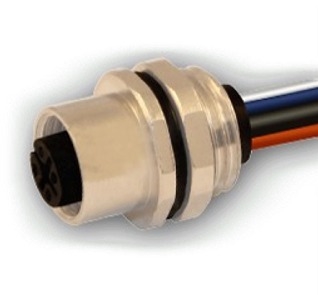 Photo unavailable. View product details. Photo unavailable. View product details.HTP M12 Panel Mount Connector, Female, 4 Pole, PG 9, 300mm, Front MountConsider for: Front-mount 4-pole with 300mm pre-wired leads (IP67) See current price Availability on product page
View Details Photo unavailable. View product details. Photo unavailable. View product details.HTP M12 Panel Mount Connector, Female, 4 Pole, PG 9, 200mmConsider for: Back-mount 4-pole with 200mm pre-wired leads (IP67) See current price Availability on product page
View Details Photo unavailable. View product details. Photo unavailable. View product details.HTP M12 Panel Mount Connector, Female, 5 Pole, PG 9, 200mmConsider for: Back-mount 5-pole, 60V/4A pre-wired signal runs See current price Availability on product page
View Details Photo unavailable. View product details. Photo unavailable. View product details.HTP M12 Panel Mount Connector, Female, 8 Pole, 200mm, FlangeConsider for: Flanged front-mount 8-pole for 30V/2A signal ports (IP67) See current price Availability on product page
View Details Photo unavailable. View product details. Photo unavailable. View product details.Mencom MDE45-4FFR-TM Ethernet Receptacle, 4 Pole, Female, M12, Through Panel MountConsider for: Through-panel D-code Ethernet port, harsh IP69 wash-down See current price Availability on product page
View Details Photo unavailable. View product details. Photo unavailable. View product details.HTP M12 Panel Mount Connector, Female, 4 Pole, PG 9, Back Mount, For PCBConsider for: Back-mount 4-pole soldering directly to a PCB See current price Availability on product page
View Details Photo unavailable. View product details. Photo unavailable. View product details.HTP M12 Panel Mount Connector, Female, 8 Pole, PG 9, Back Mount, For PCBConsider for: Back-mount 8-pole PCB port for 30V/2A signals See current price Availability on product page
View Details Photo unavailable. View product details. Photo unavailable. View product details.Mencom MDC-4FR-PCB M12 Receptacle, 4 Pole, Female Straight, 4A, M12Consider for: Front-mount 4-pole straight PCB sensor receptacle See current price Availability on product page
View Details Photo unavailable. View product details. Photo unavailable. View product details.Mencom MDC-5FR-PCB M12 Receptacle, 5 Pole, Female Straight, 4A, M12Consider for: Front-mount 5-pole straight PCB receptacle See current price Availability on product page
View Details Photo unavailable. View product details. Photo unavailable. View product details.Mencom MDC-4FR-PCB-R M12 Receptacle, 4 Pole, Female Right Angle, 4A, M12Consider for: Front-mount 4-pole right-angle PCB receptacle See current price Availability on product page
View Details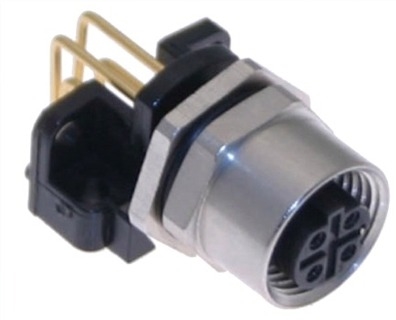 Photo unavailable. View product details. Photo unavailable. View product details.Mencom MDE45M-4FR-PCB-R Ethernet Receptacle, 4 Pole, Female Right Angle, M12, PCBConsider for: Right-angle D-code Ethernet receptacle for board mounting See current price Availability on product page
View DetailsOptions by use caseA starting point for comparison. Check the product details before ordering.
How to choose between these optionsStart with termination, because it decides how the connector joins your circuit. Choose a PCB part (M12F4PPG9BPCB, M12F8PPG9BPCB, MDC-4FR-PCB, MDC-5FR-PCB, MDC-4FR-PCB-R, MDE45M-4FR-PCB-R) when the body solders directly onto a board. Right-angle versions lie parallel to the board. Choose a wire-lead part (M124PFEMPM30 at 300mm, M124PFEMBM and M125PFEMBM at 200mm, 12FP8A0B-FL-D flanged) when you land into a terminal block. Choose solder-cup (M12F4PPG9BM) to solder your own wires. Next, pick mounting side: front-mount seats the threaded body on the outside of the panel; back-mount seats it inside. Then check the pole-specific rating: the 4-pole A-code parts shown run 250V/4A, the 5-pole here is 60V/4A, and the 8-pole parts are 30V/2A. For EtherNet/IP or PROFINET use D-coded parts (MDE45-4FFR-TM through-panel, MDE45M-4FR-PCB-R board). Most HTP parts use PG9 threads; Mencom MDC PCB parts use an M12 mounting thread; MDE45-4FFR-TM uses M16. M12 panel mount connector: how the receptacle worksAn M12 receptacle is the fixed half of a circular connection standardized on a 12mm mating thread (IEC 61076-2-101). A mating cordset threads onto the coupling nut and seals against an O-ring, giving a repeatable IP67 or IP69 joint. Behind the panel, the receptacle terminates one of three ways:
Coding keys the connector mechanically so incompatible circuits cannot mate. A-code covers general power and signal (sensors, actuators, DC power); D-code is reserved for 100 Mbit industrial Ethernet. Always verify coding on both the receptacle and the cordset before ordering. A D-code plug will not seat in an A-code port. Choosing between PCB and cable-lead M12 female panel connectorTermination style is the first decision. If your device has a circuit board directly behind the port, choose a PCB receptacle so contacts solder into board holes with no intermediate wiring. Mencom offers straight (MDC-4FR-PCB, MDC-5FR-PCB) and right-angle (MDC-4FR-PCB-R) versions; the right-angle keeps the mating axis parallel to the board for low-profile enclosures. HTP's M12F4PPG9BPCB and M12F8PPG9BPCB are back-mount PCB parts. If you land into a terminal block or splice, choose a flying-lead part such as M124PFEMBM (200mm, back), M124PFEMPM30 (300mm, front), M125PFEMBM (200mm, back). Pick lead length by the distance to your termination point. Buy a longer lead if you need slack, then trim. If you want to solder your own conductors, the receptacles such as the M12F4PPG9BM have open solder cups. Front vs back panel mount: which side to install fromFront-mount receptacles install through the panel from the outside; the threaded body faces out and a nut or flange clamps behind. Use these to retrofit a port into an already-assembled enclosure. Back-mount receptacles insert from inside the enclosure. Use these during panel build-up, or where the outside face must stay flush. Some, such as the 12FP8A0B-FL-D, use a flange instead of a nut. It bolts to the housing through a square flange, which spreads load and resists vibration better than a single lock nut. Choose the flange for machine faces that see shock or frequent mating cycles. M12 vs RJ45 female for industrial EthernetRJ45 is fine inside a control cabinet but it is not sealed and its plastic latch can release under vibration. Where an Ethernet line leaves the cabinet (onto a machine frame, a wash-down cell, or a moving axis) use a D-coded M12 receptacle instead.
D-code M12 carries 100 Mbit Ethernet on four pins. Many field devices ship with an M12 D-code port and mate to an M12-to-RJ45 patch cordset back at the switch, so the sealed connection stays outside and a standard RJ45 lands inside. Match D-code to D-code. An A-code 4-pin will physically be blocked. ATEX, Cross-brand notesTwo questions come up often. First, ATEX: none of the receptacles carry an ATEX or other hazardous-location certification, so do not specify them for Zone 0/1/2 or Class/Division areas; ask us for a rated series instead. Second, cross-brand mating: M12 A-code and D-code follow the same IEC 61076-2-101 keying regardless of brand, so an HTP A-code receptacle mates a compliant A-code cordset (Hirschmann, Mencom, or otherwise) as long as coding and pin count match; the label does not have to. M12 receptacle ratings and mounting by pole count
Common mistakes to avoidOrdering A-code when the device needs D-code Ethernet Match coding to the mating plug. D-code for 100 Mbit Ethernet, A-code for power/signal. Drilling the panel to the M12 mating face instead of the fixing thread Cut for the PG, metric, or NPT mounting thread, not the 12mm mating diameter. Assuming all poles carry the same voltage 4-pole is 250-300V, but higher pole count will decrease the voltage rating. Check the datasheet. Choosing a straight PCB receptacle for a low-profile enclosure Use a right-angle receptacle so the mating axis lies parallel to the board. Picking front-mount when building from inside the panel Use a back-mount part that inserts from the enclosure interior. Specifying these parts for hazardous locations None are ATEX-rated. Request a certified series for Zone or Division areas. Before you orderClick or tap to expand.What is an M12 panel mount connector?It is a threaded circular receptacle that mounts through a hole in an enclosure or machine housing, giving sensors, actuators and networks a sealed M12 port. The body sits on one side of the panel and a lock nut clamps it from the other (or a flange bolts it down). Termination behind the panel is either PCB solder pins, solder cups, or pre-attached flying leads. What is the difference between front and back mount M12 receptacles?Front-mount receptacles seat the threaded coupling body on the outside face of the panel and clamp with a nut behind it; back-mount receptacles insert from inside the enclosure with the thread protruding out. Choose front-mount to install into an already-assembled panel from outside; choose back-mount when you build the assembly from inside or want a cleaner outside face. Which M12 female panel connector do I need for Ethernet?Use a D-coded part. The MDE45-4FFR-TM is a through-panel D-code receptacle rated 300V/4A at IP69 with an M16 mounting thread, and the MDE45M-4FR-PCB-R is a right-angle D-code PCB receptacle rated 60V/2A at IP69. A-coded receptacles will not mate with D-coded Ethernet plugs; the keyway physically blocks. How many amps and volts can an M12 receptacle carry?It depends on pole count and the specific part, so always read the datasheet rating. Of the parts listed here, the 4-pole A-coded HTP receptacles are rated 250V/4A; our recommended 5-pole (M125PFEMBM) is 60V/4A; the 8-pole parts are 30V/2A because contacts sit closer together. The Mencom D-code MDE45-4FFR-TM is rated 300V/4A. Others can vary, so check the product page to verify before ordering. Never exceed the rating on the datasheet. What thread and panel cutout does an M12 panel mount connector use?Of the recommended options listed here, the HTP receptacles use a PG9 fixing thread with SW17 hex nuts; the HTP flying-lead parts list a 13.3mm (-0/+0.1) panel cutout. The Mencom MDC PCB receptacles use an M12 mounting thread, and the Ethernet MDE45-4FFR-TM uses an M16 mounting thread. Cut the hole to the fixing/mounting thread, not the 12mm M12 mating face. Other M12 receptacles not listed here can vary, so check on the product page to verify. What is the pin colour code on a 4-pole M12 flying-lead receptacle?The standard A-code 4-pole sequence is Pin 1 Brown, Pin 2 White, Pin 3 Blue, Pin 4 Black. Always confirm your device's pinout before wiring, and note the 8-pole uses a different eight-color sequence (white, brown, green, yellow, gray, pink, blue, red). Do these M12 connectors seal against wash-down?The HTP flying-lead and solder-cup parts are rated IP67 (dust-tight, temporary immersion to 1m for 30 min). The Mencom MDC and MDE45 receptacles are rated IP69, which adds resistance to high-pressure, high-temperature water jets, making them the better choice for food, beverage and heavy wash-down cells. A rating only holds when the mating cordset and O-ring are properly seated and torqued. Terms used in this guide (Click or tap to expand)
Still identifying the right part?Have the existing part number, equipment model, and clear photos of labels or connections ready. Confirm any missing compatibility details before ordering. Contact Products for AutomationPrices and availability are live. Check the product page for the latest details. |