
5001 Operating Instructions
Major 5001 · Operating Instructions
Major 5001 Wire Stripping Machine: Setup & Operating InstructionsSet the wire size, stripping length, and insulation removal mode on the Major 5001 electric wire stripper. Use the numbered diagram to identify each control, then check the settings on a test wire before processing additional wires.
Setup at a Glance
Three settings before stripping
Major 5001 Wire Stripper DiagramMatch the control numbers in the diagram to the instructions below. Select the image to open the full-size drawing. 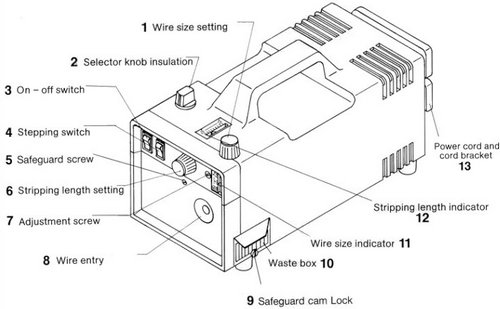
Set the Wire SizeTurn the yellow knob (1) to adjust the wire size setting. Use the wire size indicator (11) for reference. The indicator is calibrated for wire with standard PVC insulation. If the insulation is nonstandard or the wire size is unknown, establish the correct setting through trial adjustments. Start with a larger wire size setting, then work down gradually to the final setting. Check the test strip: If the insulation is cut too deeply or not deeply enough, adjust the wire size setting and test again before continuing. Set the Stripping LengthTurn the blue knob (6) to set the required stripping length. Check the stripping length indicator (12) for reference as you adjust the knob. Select Complete or Partial Insulation RemovalPush selector knob (2) and turn it to the symbol for the required insulation removal mode. Use the symbols below to identify the correct position.
Insert the Wire and Start the Stripping CycleInsert the wire horizontally into the wire entry until it meets the stop. Touching the stop automatically actuates the stripping operation. Remove the wire once the stripping cycle is complete. Check the stripping length and insulation removal result, and adjust the settings as needed before processing additional wires. Automatic actuation: Contact with the wire entry stop starts the stripping operation. Empty the Insulation Waste BoxRemoved insulation collects in the sliding waste box on the right side of the Major 5001. Empty the box periodically during use. For extensive use, operating without the waste box may be more practical for managing the removed insulation. |

